728x90
반응형
터미널에서 아래 명령어를 입력하여 Swagger 관련 패키지를 설치합니다.
npm install --save @nestjs/swagger swagger-ui-express
main.ts 파일에 다음과 같이 설정을 추가합니다.
import { NestFactory } from '@nestjs/core';
import { AppModule } from './app.module';

// Swagger 관련 import
import { SwaggerModule, DocumentBuilder } from '@nestjs/swagger';

async function bootstrap() {

  const app = await NestFactory.create(AppModule);

  // Swagger 설정 추가
  const config = new DocumentBuilder()
    .setTitle('[프로젝트 이름] API')
    .setDescription('[프로젝트 이름] API 문서')
    .setVersion('1.0')
    .addBearerAuth() // JWT 입력창 추가
    .build();

  const document = SwaggerModule.createDocument(app, config);
  SwaggerModule.setup('api-docs', app, document); // http://localhost:3001/api-docs

  await app.listen(process.env.PORT ?? 3001);
}
bootstrap();
이후 http://localhost:3001/api-docs 경로로 접속하면 아래와 같은 API 문서를 확인할 수 있습니다.

위의 사진에서 볼 수 있는 것처럼 아직 Swagger 데코레이터를 작성하지 않았음에도 컨트롤러 경로에 따라 문서가 자동으로 생성된 것을 볼 수 있습니다. (토글 버튼을 눌러 확인해보면, 안의 내용은 비어있는 상태입니다.)
먼저 아래와 같은 DTO에 Swagger 데코레이터를 추가해보겠습니다.
// 수정 전
export class CreateUserDto {
  email: string;
  username: string;
  password: string;
}
// 수정 후
import { ApiProperty } from '@nestjs/swagger';
export class CreateUserDto {
@ApiProperty({ description: '사용자 이메일' })
email: string;
@ApiProperty({ description: '사용자 이름' })
username: string;
@ApiProperty({ description: '비밀번호' })
password: string;
}
코드 작성 후 http://localhost:3001/api-docs에 접속해 확인해보면 아래와 같이 설명이 추가된 것을 볼 수 있습니다.
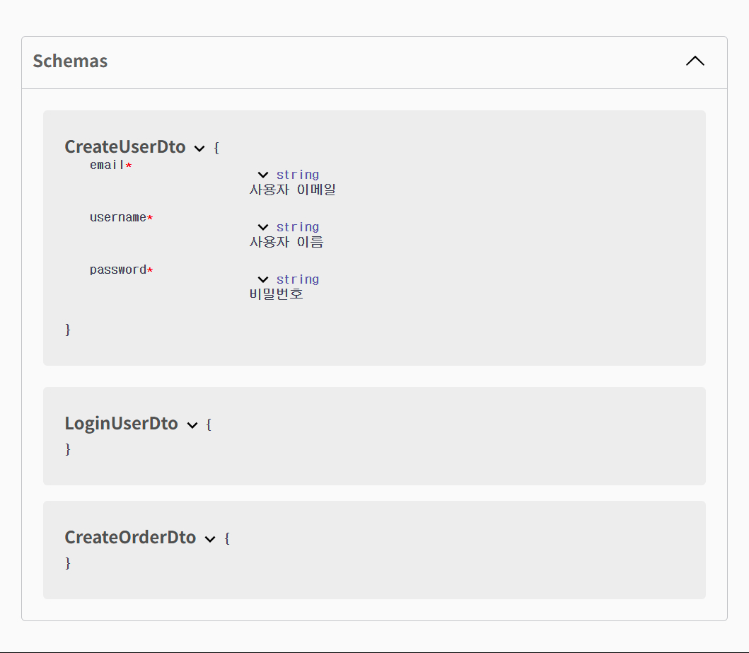
이처럼 원하는 설명, 예시, 응답 구조는 @ApiProperty, @ApiOperation, @ApiResponse 등을 통해 코드에서 직접 지정해주면 됩니다.
| @ApiTags() | API 그룹 묶음 (섹션) 이름 |
| @ApiOperation() | 엔드포인트 설명 |
| @ApiResponse() | 응답 타입/설명 문서화 |
| @ApiBody() | 요청 body 문서화 |
| @ApiParam() | URL 파라미터 설명 |
| @ApiQuery() | 쿼리 파라미터 설명 |
'Category > NestJs' 카테고리의 다른 글
| NestJS에서 DTO는 왜 클래스(class)로 작성해야 할까? (0) | 2025.04.08 |
|---|---|
| NestJS에서의 테스트 작성 예시 (1) | 2024.10.30 |
| NestJS에서의 테스트: 기본 개념부터 실제 사용까지 (0) | 2024.10.30 |